How to turn a short-form video into a customer path
A practical workflow for small businesses: start from a customer question, show real proof, give one next step, track the destination, and review more than views.
By Successful Marketing Solutions · · 5 min read
A short video can be watched, enjoyed, and forgotten in under a minute. For a small business, the goal is usually a little more: help the right viewer understand what you offer and know what to do next. That takes a path, not just a clip. This guide breaks the path into six steps you can plan before you film.
- Customer question
- Hook
- Observable proof or process
- One clear next step
- Tracked destination
- Review
1. Start with a real customer question
The strongest topics usually come from questions customers already ask: How long does this take? What is included? Is this right for me? Writing the question down first keeps the video focused and makes it easier to choose the page it should lead to.
2. Open with a hook that names the question
The first seconds should tell the viewer what the video is about. A plain spoken line or on-screen text that restates the question works better than a long introduction or a logo animation.
3. Show proof people can see
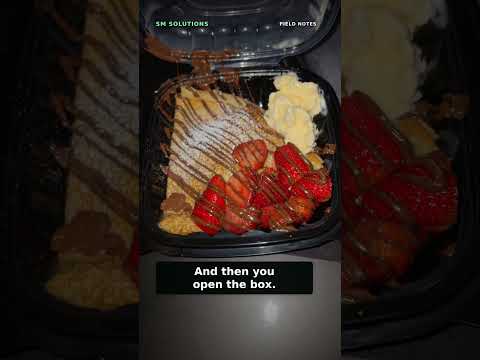
Viewers trust what they can observe. Our videos filmed during independent business visits illustrate this. In “Show the process” (filmed at Nekter in Stockton), the lesson is that showing ingredients and preparation helps customers understand what they are getting. In “Three paths to trust in your business,” the point is that reviews, recommendations, and seeing the work for yourself each build confidence. In “Sell the experience” (Bob’s at the Marina), the setting and first bite are shown as part of what customers choose. In “Make your brand memorable” (Drizzled), the trailer, sign, and packaging tell one consistent story.
4. Give one clear next step
End with a single action that matches the question: see the menu, view the service, or request a quote. Several competing calls to action at once tend to dilute each other. Keep the wording consistent with the page it points to.
5. Send people to a tracked, consistent destination
Decide which page each video should lead to and use the same destination across a series. Google Analytics explains how to add campaign parameters (UTM tags) to a URL so visits from a specific platform or campaign can be identified. Use one consistent naming pattern, for example the platform as source and the series name as campaign, so later reports are readable. Tagging improves visibility but does not capture everyone; some viewers will search your name or visit later.
6. Review more than views
View counts alone are incomplete. YouTube’s help documentation distinguishes several measures, including engaged views, how many viewers stayed to watch, watch time, and audience retention. Its key-moments retention report can show where viewers dropped off or kept watching, which helps you judge whether the hook and proof held attention. Alongside platform metrics, review profile and link clicks, visits to the tagged destination, and inquiries you can reasonably attribute where reliable data exists. Keep notes on what you changed so the next review compares like with like.
Captions are part of the path
Captions keep the message available when audio is not, and they help viewers who are Deaf or hard of hearing. The W3C Web Accessibility Initiative explains that captions present spoken dialogue and important sounds as text synchronized with the video. Accurate captions, not just unreviewed auto-generated text, make the hook and next step understandable to more people.
Unplanned clip
- Random footage of the kitchen
- No caption or on-screen text
- “Link in bio” to the homepage
- Success judged by views alone
Planned path
- Question: “Can I order a custom cake for this weekend?”
- Hook names the question; proof shows decorating steps
- Next step: “See custom cake options” on a tagged link
- Review retention, link clicks, and order inquiries monthly
The bakery above is fictional and shows planning only. It does not describe a real client or predict any outcome.
Sources
Want help applying this?
Bring your question to a free 30-minute 90-Day Marketing Rollout Meeting with Lamont. Discuss your goals and next priorities, with no obligation.
All appointments are booked through Square. Choose your service and available time there. Free 30-minute Google Meet with Lamont. Discuss your goals, outline your next 90 days, and see whether ongoing marketing support fits your business. No obligation. Your Google Meet link will be sent separately before your call.